

Artificial intelligence tools are changing the way businesses create presentations, reports, and strategy decks. One of the newest features getting attention is Claude Design, a tool from Anthropic that can turn spreadsheets, reports, and raw data into professional slide decks automatically.
In this tutorial, you’ll learn how to use Claude Design to create presentation-ready strategy decks using CSV files, analytics reports, marketing data, and more.
If you’ve been looking for an AI PowerPoint generator that actually produces useful business insights, this may be one of the most interesting new AI tools available right now.
What Is Claude Design?
Claude Design is a feature inside Claude AI that helps users generate visual slide presentations from uploaded data.
Instead of manually building slides in PowerPoint or Google Slides, Claude Design analyzes your files and creates:
- Strategy decks
- Charts and rankings
- Performance summaries
- Recommendations
- Speaker notes
- Presentation layouts
The tool is especially useful for:
- Social media reports
- Marketing campaigns
- YouTube analytics
- Facebook Ads data
- Sales reports
- Business performance reviews
How To Access Claude Design
To begin using Claude Design:
- Go to Claude.ai
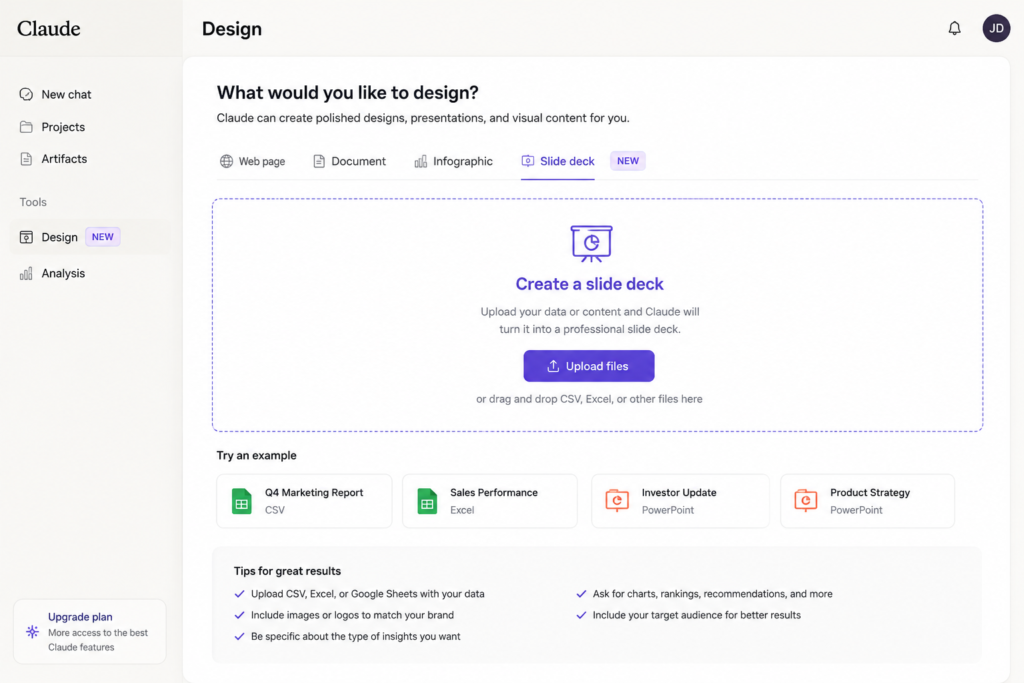
- Open the Design section
- Choose “Slide Deck”
- Upload your files or spreadsheet data
- Enter a prompt describing the presentation you want created
Claude can work with CSV files, spreadsheets, analytics exports, and other structured data sources.
Best Data To Upload Into Claude Design
Claude Design works best when you upload organized data files.
Examples include:
- Facebook Ads exports
- YouTube analytics CSV files
- Ecommerce reports
- Google Analytics exports
- Sales spreadsheets
- SEO keyword reports
- Marketing campaign data
The cleaner your data is, the better your presentation results will be.
Best Claude Design Prompt For Strategy Decks
One of the most important parts of getting good results is using the right prompt.
Here is a strong example prompt:
“Turn these files into a strategy deck on performance. Analyze the results by item and extract best practices from the data and assets. Use charts, rankings, and concrete recommendations. Match images or creative files to CSV using the filename or matching field. Keep it presentation-ready.”
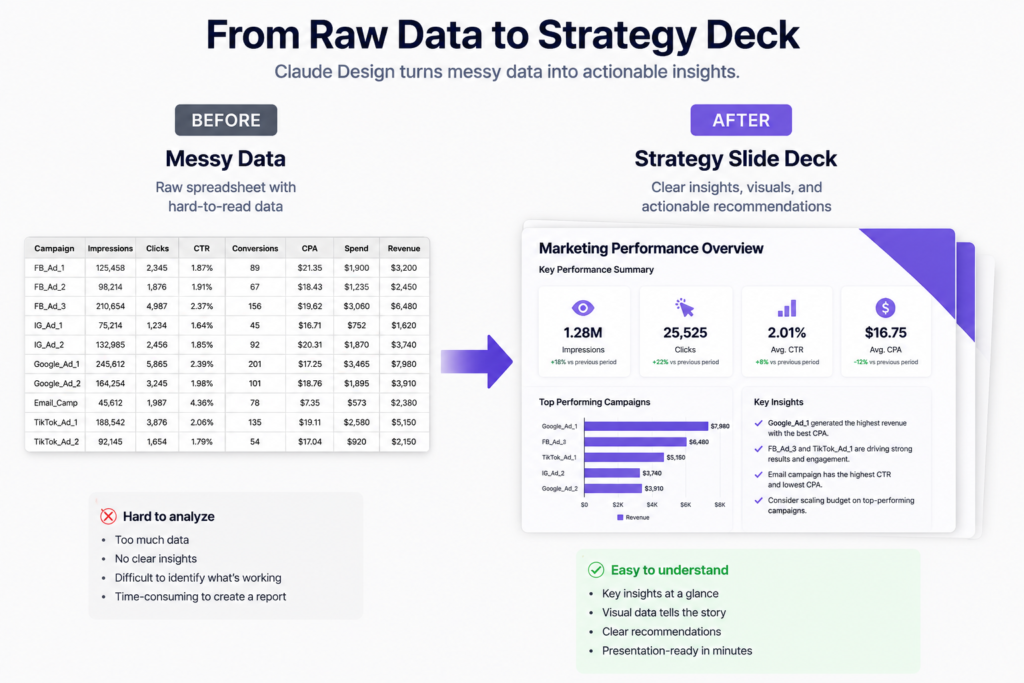
This type of prompt encourages Claude Design to:
- Analyze patterns
- Rank performance
- Generate recommendations
- Create charts automatically
- Build business-ready slides
How Long Does Claude Design Take?
Most slide deck generations take between 10 to 15 minutes depending on the amount of data uploaded.
Larger datasets may take longer.
Once completed, the deck can typically be exported into:
- PowerPoint
- Google Slides
- Presentation-ready formats
This makes it useful for agencies, marketers, consultants, and business owners who need fast presentation creation.
Claude Design For Marketing Reports
One of the best uses for Claude Design is creating marketing strategy decks.
Instead of manually reviewing spreadsheets, the AI can summarize:
- Top-performing ads
- Best engagement metrics
- Traffic patterns
- Conversion trends
- Audience behavior
- Content recommendations
This can save hours of manual presentation work.
For small businesses and marketing agencies, this type of AI automation could become a major productivity tool.

Claude Design vs Traditional PowerPoint Creation
Traditional presentation creation usually involves:
- Building slides manually
- Designing charts
- Copying data
- Writing summaries
- Formatting layouts
Claude Design automates much of this process.
Advantages include:
- Faster workflow
- Automated analysis
- Built-in recommendations
- Easier reporting
- Less repetitive design work
However, human editing is still important before presenting to clients or teams.
Is Claude Design Good?
Claude Design appears to be one of the more practical AI presentation tools currently emerging in the AI productivity space.
The biggest strength is not just generating slides, but actually analyzing uploaded data and turning it into actionable insights.
For marketers, consultants, agencies, and content creators, that combination could make it a valuable business tool moving forward.
Final Thoughts
AI presentation tools are rapidly evolving, and Claude Design is one of the newest platforms attempting to simplify strategy deck creation.
If you regularly create reports, performance reviews, or client presentations, it may be worth testing how well Claude Design handles your workflow.
As more users experiment with AI-generated presentations, tools like Claude Design could significantly reduce the time required to turn raw business data into polished slide decks.
For anyone searching for an AI slide deck generator, AI PowerPoint creator, or automated strategy presentation tool, Claude Design is definitely one to watch.